Regional contacts are DCBS staff who manage all the Prevention initiatives in their region. They are authorized to “view only” the Primary Prevention meetings and events that occur in counties in their region. They can print a full report of any single meeting or event.
A website administrator must assign a regional contact a user name and password. If you need to have a regional contact account set up, contact Lynne.mason@ky.gov identifying who you are and requesting an account.
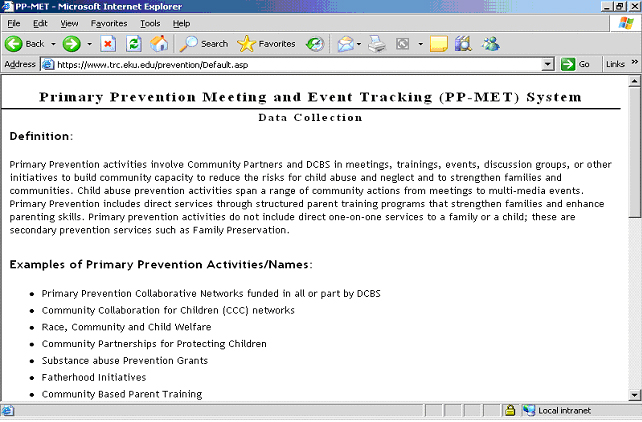
First go to https://www.training.eku.edu/prevention/Default.asp. It looks like this:
Scroll down and click “Login” under the Tools section.
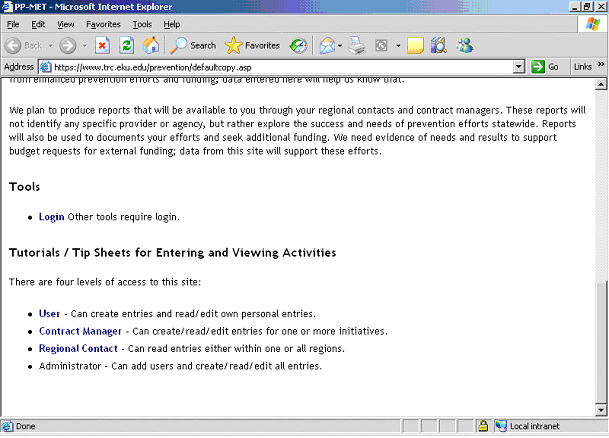
Enter your assigned user name and password. Click “Submit.” You will return to the main page. It looks the same, but now you are logged in and have the ability to view the reported activities within either your one region or within all regions, depending on how your account is set up.
Once you have logged in and returned to the main page, you can click “View a listing of reported activities” in the Tools section. You will be taken to a page that looks similar to this:
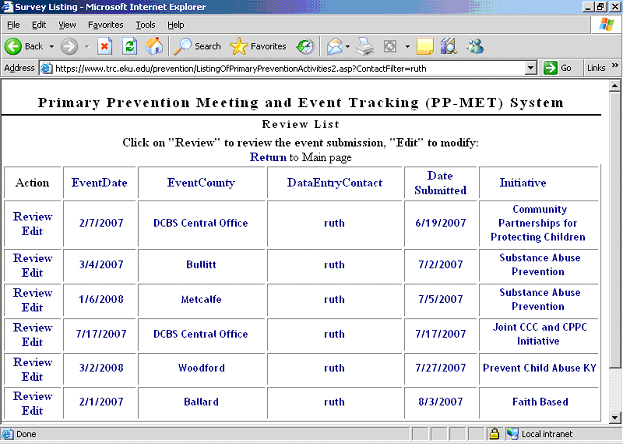
In the leftmost column, you will only have the ability to review activities. You will not be able to edit entries. To see the details of an activity, click “Review”. You will be taken to a report page that you can print for your records or dissemination if desired.
If you click on any of the blue column headings, such as “Event Date”, “Event County”, etc., the list will be reordered in terms of whichever column heading you clicked. For example, if you click “Event County”, the list will be rearranged in alphabetical order of the counties.
Clicking on blue words within the columns shortens the list. If, for example, you click “Woodford” in the “Event County” column, then the list will be shortened to only include entries for Woodford County. To return to the full listing, click any of the column headings.